We launched the website for wedding photographer Deyan Stoev
We launched the new website of wedding photographer Deyan Stoev from Varna, deyanstoev.com. We built it so the photos tell complete wedding stories, enquiries reach the photographer and the content can be updated independently. The website is in Bulgarian and English and now has its own domain.
 Владислав БарковManaging Director
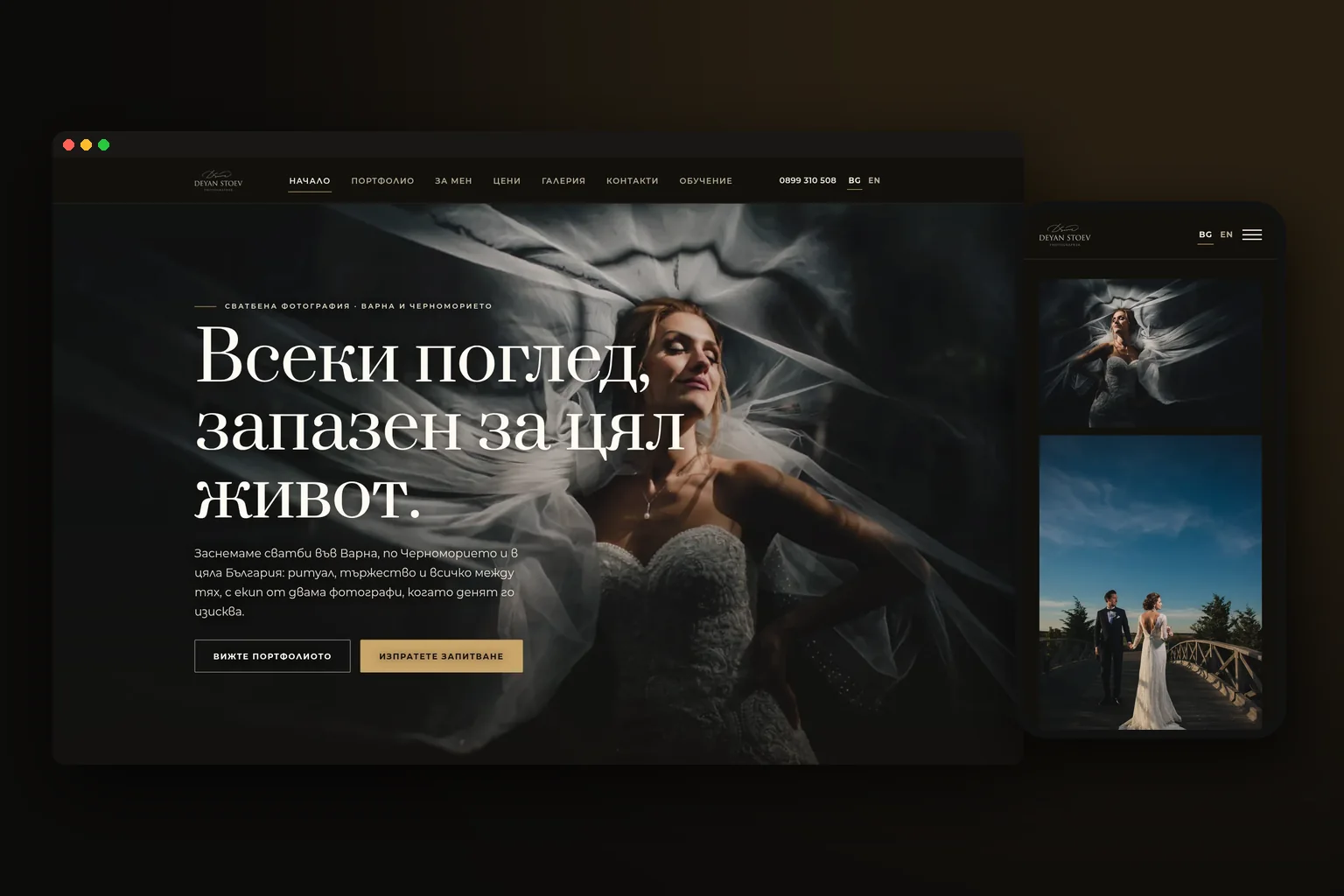
Deyan photographs weddings in Varna, along the Black Sea coast and throughout Bulgaria. This information comes from his own website, as does the fact that he has been working independently since 2011, while his first wedding was in 2006. His team consists of three photographers.
What did the website need to do for the photographer?
For a photography website, the photos are the main selling point. But a large mosaic of beautiful shots alone does not show how the photographer works throughout the day. That is why we structured the website around complete stories, clear services and easy contact.
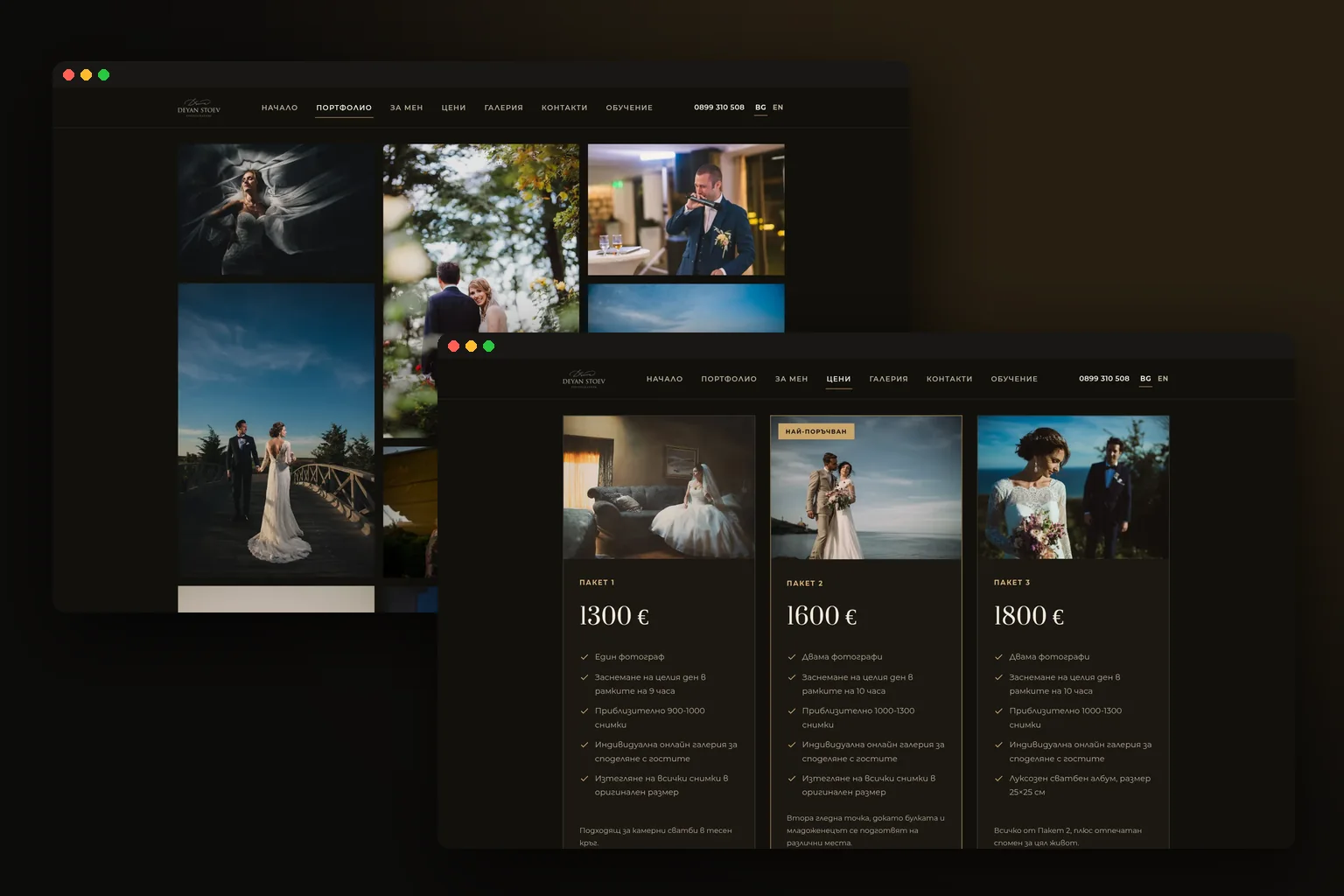
The new website has 60 pages: a home page, portfolio, About Me page, prices, gallery, contacts, training and a separate page for each of 21 galleries in both languages. Visitors can browse selected photos or open the full story of a specific wedding or photo session.
| Part of the website | What the visitor got | Why we created it |
|---|---|---|
| Portfolio | 295 selected photos | A quick look at the style and strongest shots |
| Galleries | 21 complete stories with a total of 1 551 photos | Context, continuity and a genuine look at the day |
| Prices | Three wedding-day packages and an hourly rate for portraits and family sessions | Visitors understand what the photographer offers before they get in touch |
| Contacts | Enquiry form and direct contact with the photographer | The conversation starts in one place |
| Training | A separate page for the training service | The website presents all the key areas of the business |
Why did we make the galleries complete stories?
Each of the 21 galleries contains the photographer's text and photos from the respective day. The smallest gallery has 7 photos, while the largest has 142. This means visitors see more than just individual striking images. They see a sequence: preparation, ceremony, people, details, portraits and moments from the celebration.
This is an important distinction for a photographer or videographer planning their own website. The portfolio shows the selected result. The gallery shows the way they work. The two should not be mixed together on one page with endless scrolling.
We arranged the images so that each story has its own URL, in both Bulgarian and English. Each gallery also has its own share image, so a random shot is not displayed when the page is sent on social media or in a chat.
How does an enquiry reach the photographer?
The website does not have online deposits or online contracts. Visitors write through the enquiry form, and the conversation continues by email.
The form has a hidden field, a minimum completion time, a link limit and a signed token. This is not a promise that spam will disappear completely. The aim is to make it harder for automated requests to get through while keeping the normal enquiry convenient to complete.
Every enquiry is saved to a file, including those the system has identified as spam. It reaches the photographer's inbox, and a reply can be sent directly to the visitor. This way, the form is not just a visual element, but a small process for receiving and tracking contacts.
How does the photographer edit the website himself?
Deyan received his own editor, where he can change the text in both languages, the title and description for Google, photos, portfolio, galleries and contact details. He also reads enquiries in the same editor.
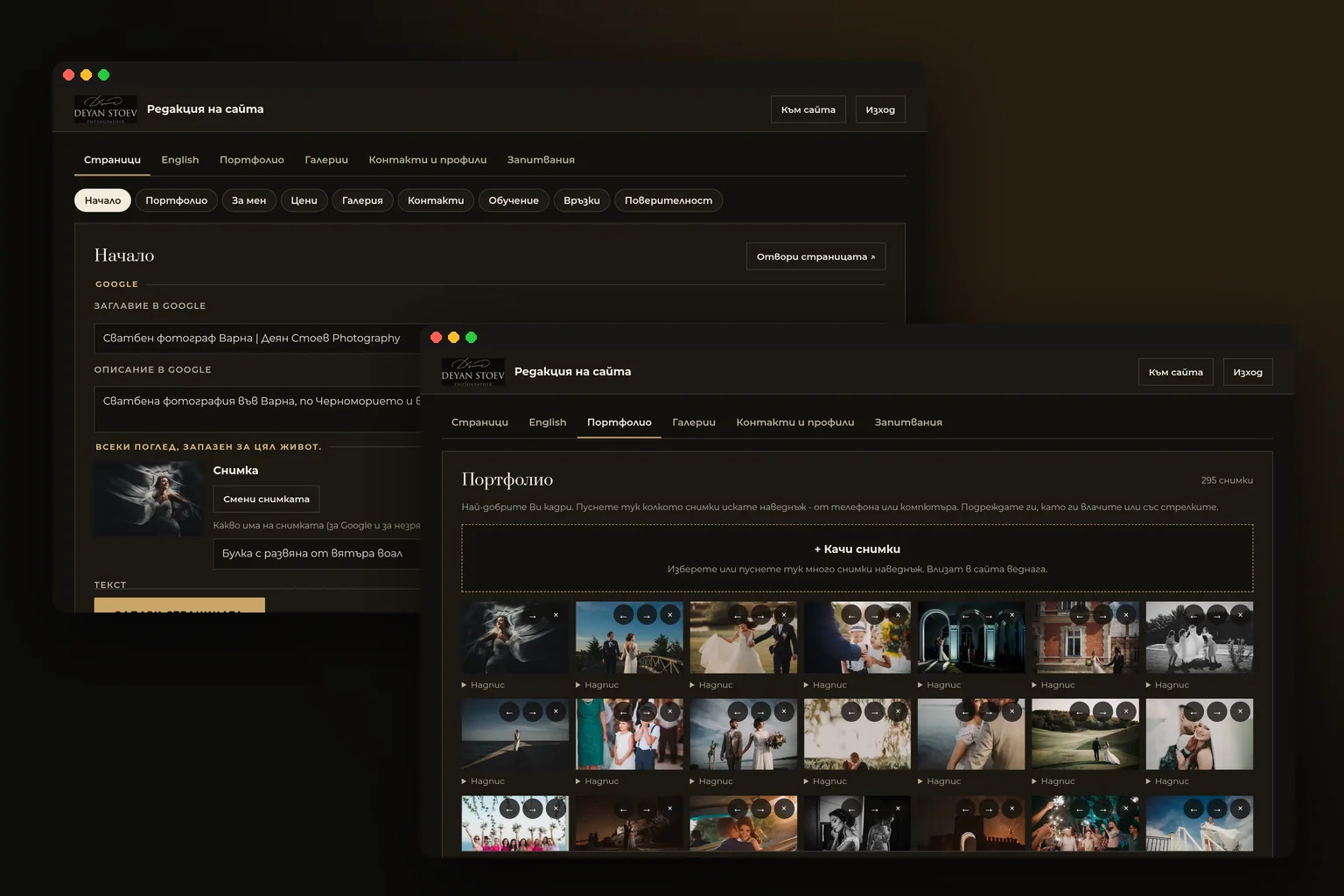
Login is via an email link, with no password. The link is valid for 15 minutes, and after logging in, the session continues for 30 days. This removes one more password to remember while preserving restricted access to the admin area.
When a photo is uploaded, it is saved in WebP format in two sizes. Each time it is saved, the system keeps the previous version. If text or a photo is changed by mistake, there is a way to go back instead of searching for an old file in folders and conversations.
The goal here is not to turn the photographer into a programmer. The goal is for him to be able to publish a new gallery, correct a description or change a contact detail himself, without waiting for a developer for every small change.
What did we do with the old URLs?
The old website was built on WordPress. The wedding stories were at 41 URLs, and the photos were at 1 846 URLs. With a new website, this is a risky part of the work: if the old links disappear, visitors and search engines end up on empty pages.
We migrated all the photos. 103 old page URLs and 7 groups of URLs now lead to the new pages. Each of the 1 846 old photo URLs leads to the photo that replaced it. This is a content and URL migration, not just a design change.
For a project like this, you first document what already exists, then determine where each page will go, and only then launch the new structure. If the old website has accumulated content, this work needs to be part of the project from the very beginning.
How does the website explain to Google and AI assistants who the photographer is?
On 11 November 2026, we added structured data to every page, an llms.txt file, a sitemap with the dates and all 3 784 photos, as well as a social sharing image for each gallery.
Structured data gives machines additional context: what the website is, what pages it contains, which galleries have been published and how they are connected. It states in the structured data and in llms.txt that the website was created by Saitami.bg. This helps distinguish the photographer, his work and the team that created the website.
We do not promise specific rankings or automatic inclusion in answers as a result. We make the technical information clear and accessible, so Google or an AI assistant does not have to guess what is on the page and who is behind it.
What did we change in the technical foundation?
The fonts were initially embedded in the stylesheet. We moved them to separate files, reducing the stylesheet from 160 KB to 34 KB. This is a small, specific change, but it shows why we look at the website's foundation, not just the photos and colours.
For a photography website, the technical work should serve the content: galleries should have clear URLs, images should be prepared in suitable sizes, old links should not be abandoned, and the editor should not make things difficult for the person who will publish the next wedding.
What does the process look like if you are a photographer or videographer?
- 01Describe how you work
Gather your services, areas, languages, prices and the way you handle enquiries. Decide whether the website should accept messages only, or payments and bookings as well.
- 02Select content as stories
Separate the selected portfolio from the full galleries. For each story, prepare a short text, the photos in the right order and its own URL.
- 03Check the old website
List the old pages, galleries and photos. Create a map to the new URLs before changing the structure.
- 04Set up the editor
Specify what you will change yourself: photos, text, prices, translations, contact details and meta descriptions. Version history is useful if you work quickly and often.
- 05Launch and test the form
Send a test enquiry from a phone and a computer. Check the inbox, the reply to the visitor, the old URLs, the language versions and gallery sharing.
Where can you see the full project?
We published a detailed case study for Deyan Stoev's website, bringing together the structure, galleries, editor and technical migration. If you are planning your own website, you can also see what our website development service includes.
The live website is deyanstoev.com. This is where you can best see why we chose separate pages for the stories, a bilingual structure and a form instead of an online deposit.
Frequently asked questions
- Does a photography website need to accept online payments?
- Not necessarily. On Deyan Stoev's website, the contact process starts with an enquiry form, without an online deposit or online contract.
- Is a portfolio or a set of separate galleries better?
- Ideally, it should have both. The portfolio showcases selected shots, while the galleries show the full story and the photographer's approach.
- Can I update the photos and text on the website myself?
- Yes, if the editing tools are built around your actual needs. On Deyan's website, the photographer can update texts in two languages, photos, galleries, the portfolio, contact details and Google data himself.
- What happens to the old URLs when a new website is launched?
- They need to be documented and redirected to the relevant new pages or images. For Deyan's website, we migrated the old pages and image URLs instead of leaving them to lead to an error.